HyperFrames in Claude Code, Tested: 6 Product Videos and 2 Rounds of Edits
We asked Claude Code for the same 15-second product video six times, three with HeyGen's HyperFrames skills and three as plain Claude Code, then asked for two edits. Every run rendered a correct 1080p clip. HyperFrames pulled the real site into the video, took about three times as long, and handled each edit in about two minutes.
Summary
HyperFrames is worth installing when the video should look like your product. With its skills, Claude Code captured agentcraft.dev, reused its fonts, colors and gallery images, and rendered through the HyperFrames CLI. Plain Claude Code also delivered a correct clip every time, faster and for less, as clean text animation. Pick HyperFrames for branded videos you will keep editing; for a quick title card, plain Claude Code is enough.
The clip above is the HyperFrames video after both edits: the gallery images swapped and a soft music bed added.
Three findings matter most:
- Every run rendered. All six clips came out 1920 by 1080, 30 fps, exactly 15.0 seconds, with the counter landing on 5,087.
- HyperFrames brought the site in. All three HyperFrames videos showed real gallery images from the captured page; all three plain videos were text only. Two of the three HyperFrames runs also picked an anime poster and an earbud ad from the gallery, so check what the capture grabs.
- Edits were quick. Swapping the images took 81 seconds and $0.020; holding the counter and adding music took 127 seconds and $0.019.
How we tested
- Brief. One prompt for every run: a 15-second 1920 by 1080 product intro for AgentCraft with three beats, the name with a fade-in title, a line about prompts shown with real outputs, a line about the skills directory with 5,087 counting up, then the URL, rendered locally to an MP4.
- Arms. HyperFrames: the four core skills from heygen-com/hyperframes (hyperframes, hyperframes-cli, hyperframes-registry, media-use) in
.claude/skills/, with the prompt starting Using /hyperframes and naming the npx hyperframes CLI. Plain: the same brief in an empty folder. Both arms blocked HeyGen sign-in, publish, share and cloud render. - Install. The official
npx skills add heygen-com/hyperframesclones the whole repository, about 540 MB, and the clone broke on our connection, so we checked out only its skills folder and copied the four skills in. - Runs. Three per arm, each a fresh
claude -psession on Claude Code 2.1.322 with--model haikuand--setting-sources project. Cost, turns and tokens come from Claude Code’s JSON output; time is wall clock. - Checks. We probed every MP4 with ffprobe and pulled frames at 2, 6, 10, 11 to 12 and 14 seconds. Then we gave the first HyperFrames project two edit requests in new sessions.
Our first three plain runs looked around the folders above them, found this test’s notes and the first HyperFrames project, and copied its approach. We discarded them and ran plain Claude Code again in an isolated folder; the numbers below are from those clean runs.
Results
| HyperFrames | Plain Claude Code | |
|---|---|---|
| Rendered a correct 15 s 1080p clip | 3 of 3 | 3 of 3 |
| Counter ends on 5,087 | 3 of 3 | 3 of 3 |
| Real site images on screen | 3 of 3 | 0 of 3 |
| Franchise or brand images picked up | 2 of 3 | 0 of 3 |
| Median time | 272 s | 92 s |
| Mean cost | $0.032 | $0.012 |
| Median turns | 29 | 13 |
| Median output tokens | 13,910 | 8,358 |
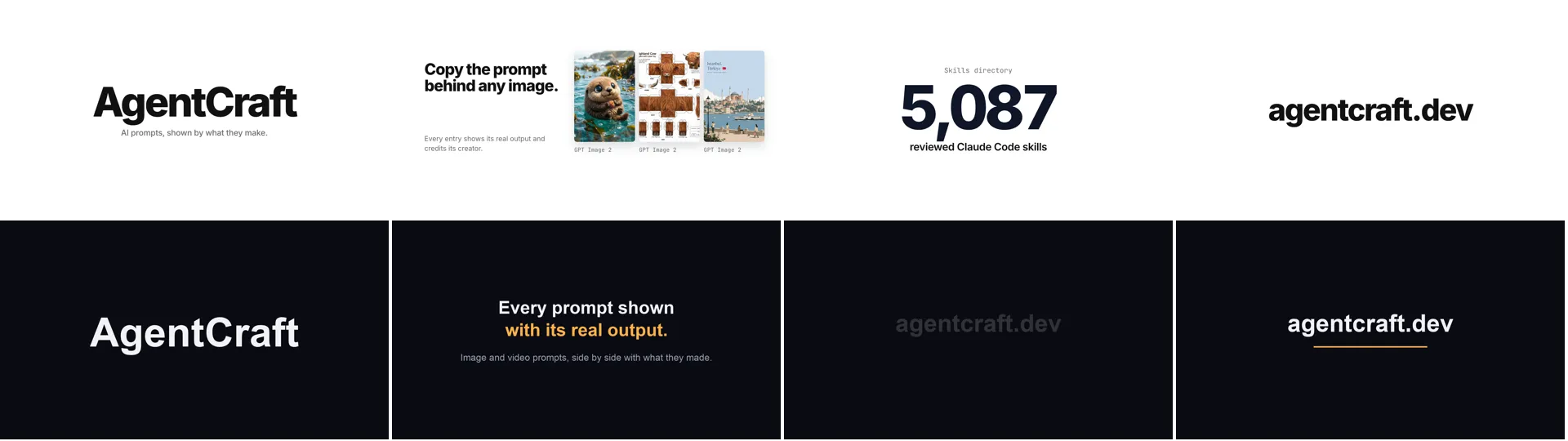
How each arm got there:
- HyperFrames followed the skill:
npx hyperframes capture https://agentcraft.devto pull text, colors, fonts and images,initfor a project, an index.html with timed animations,checkto lint it,snapshotto look at key frames,renderto MP4, then ffprobe to confirm. Capturing the site took about two minutes in the first run. The first run’s check caught a font size that was too small, and the run fixed it before rendering. - Plain Claude Code wrote a Python script that draws each frame and pipes the frames into ffmpeg. Our machine has ffmpeg, but it was off the agent’s PATH, so each plain run fetched its own encoder package: ffmpeg-static from npm, imageio-ffmpeg in a fresh virtual environment, and static-ffmpeg installed with pip. We removed what they installed afterwards.
- The edits ran on the first HyperFrames project. In round 1 it swapped the anime poster and earbud ad for an otter, a papercraft cow and a travel poster, kept the layout, and pointed out on its own that one new card cropped its title. In round 2 the counter reached 5,087 at 11.0 seconds and held until the URL, and it generated the music itself: a Node script that writes a soft synthesized pad into a WAV file. The round 2 render itself took about 8 seconds.
Our picks
A branded product video you will revise: HyperFrames, 84,399 stars on November 15 and Apache 2.0. In Claude Code, install the plugin with claude plugin marketplace add heygen-com/hyperframes and claude plugin install hyperframes@hyperframes, then ask for a video and name the site to capture. The project stays as HTML you can edit by asking, and each re-render took seconds in our runs.
A quick title card or counter: plain Claude Code. Give it the beats and the length; it will write a frame renderer and encode it. Put ffmpeg on the agent’s PATH first, or it will go and install one.
Either way: list which images may appear. Capture takes whatever is on the page, and our gallery holds fan art and product ads that belong to other people.
What to ignore
- Run time as quality. HyperFrames spent most of its extra time capturing the site and checking frames, which is where its richer result came from.
- The Studio app. HyperFrames also ships a free desktop app with a paid Pro plan for HeyGen’s models; this test used only the open source CLI and skills, locally.
- Our dollar figures as your bill. These are Haiku prices for a 15-second clip. Longer videos, a larger model or more edit rounds cost more.
FAQ
What is HyperFrames?
An open source framework from HeyGen that turns HTML, CSS, media and seekable animations into MP4 video. You can run it from its CLI, from coding agents through its skills, or in its desktop app. Its tagline is Write HTML. Render video. Built for agents.
What do I need installed?
Node 22 or newer, ffmpeg and a Chrome the CLI can run headless. npx hyperframes doctor checks them; ours flagged Docker and Kokoro text to speech as missing, and rendering worked fine with just Node, ffmpeg and Chrome.
Can it add music or a voiceover?
In our second edit it added music by generating a synthesized track and attaching it as an audio element in the composition. The skills also cover text to speech through Kokoro, which we left uninstalled.
Limitations
One brief, three runs per arm, on one small model. The edits ran once, on one project. We judged the videos from frames and ffprobe; whether one looks better than another is partly taste, so watch the clip and the frames above.
Reproduce it
The script is the run script: bash run.sh hf 1 or bash run.sh plain 1, with the four skills and a settings file that blocks sign-in and publishing in a proj/.claude folder next to it. Run the plain arm in an isolated folder, away from the test files. hyperframes-claude-code-2026-11.json has one row per run with time, cost, turns, tokens and what reached the screen, plus both edit rounds.
Sources
- heygen-com/hyperframes · official
- HyperFrames docs: quickstart · official
- Claude Code docs: Agent Skills · official
- AgentCraft: Claude Code media skills · blog